Published: June 11, 2026 • 3 min read
Alation for Codex: How to Use the Trusted Context Layer

Jagannath (Jags) SaragadamSenior Software Engineer, Alation
OpenAI has announced a new ecosystem of role-specific plugins for Codex, and Alation is among the featured partners. If you're on a data team already using Codex, or exploring it, here's what the integration actually does and how to get started.
Analysts and data scientists are already fast with AI in the loop, drafting SQL and assembling reports in a fraction of the time it used to take. Give that same model the verified definitions, endorsed metrics, and schema your data team maintains, and the speed comes with accuracy to match. The analyst stops breaking focus to confirm a table is the right one, and the data steward knows the model is working from endorsed sources because these are the only context it is given.
The Alation Trusted Context Layer plugin for Codex closes that gap. It puts the governed catalog inside the chat environment, so the context an analyst needs and the oversight a steward expects come from the same place. It encompasses the governed metadata your data team curates, including endorsed definitions, certified metrics, and data quality signals, and is now available directly inside Codex.
This plugin is built for teams already using Codex's data analytics capabilities: analysts and business users exploring product data, investigating metric changes, and building reports in tools such as Snowflake, Databricks, Hex, and Tableau.
What a verified answer looks like
Here is the integration on a real question. An analyst needs to deliver a report by the end of the day. He asks the agent to evaluate an MRR figure. Instead of inferring table structures, the agent pulls the endorsed MRR definition and runs the approved SQL only *after* the analyst signs off on the query:
Why trusted data is key in AI
AI agents are only as good as the context they're given. Ask an ungrounded model about MRR, and it may pull from a stale draft metric, an unapproved table, or nothing at all, and confidently present the result as fact. The "garbage in, garbage out" problem doesn't go away with AI; it gets faster. The Alation plugin addresses this at the source, giving Codex access only to what your data team has reviewed, endorsed, and certified.
The plugin connects Codex to Alation through a set of Skills and MCP tools:
Skills give the model knowledge of how to navigate Alation: how to find a data product, read a business definition, or check a table's certification status.
MCP tools are the executable functions that let the model actually retrieve or surface that content in the chat.
Together, they read the same catalog that the data team curates, which enables inline exploration.
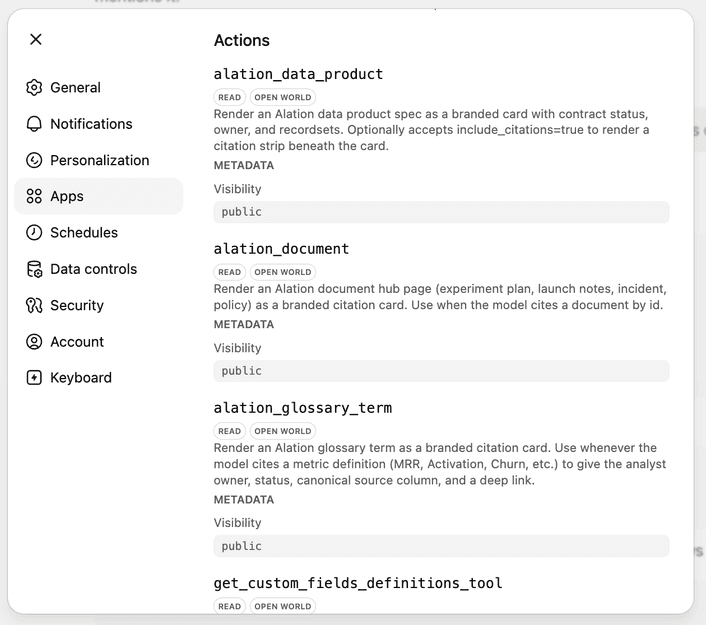
Checking whether a table is production-ready used to mean leaving the editor, searching the catalog in a browser, and copying a schema back into the prompt. Now the answer renders in the chat. Ask about subscription data, and Codex returns the actual data product card.
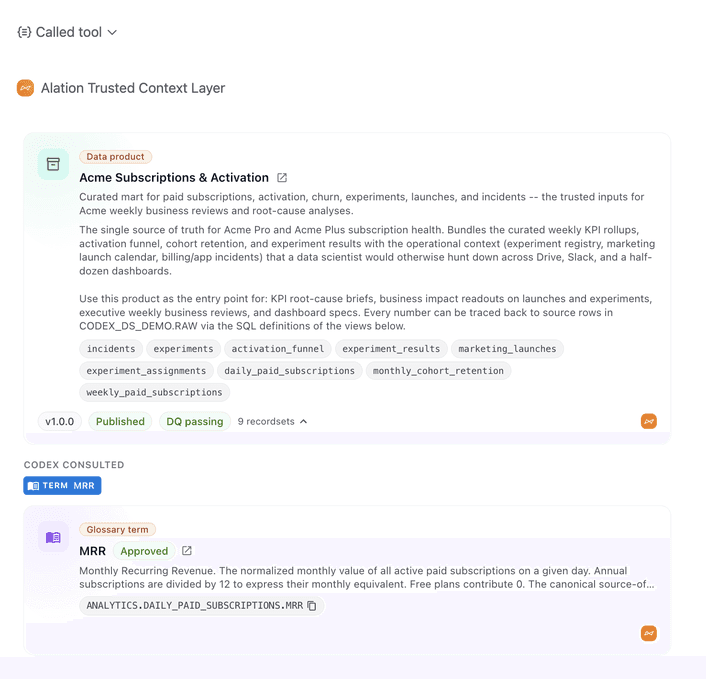
The data product card retrieved from Alation carries its versioning, data quality status, and business definitions in the same view. Trust levels show up before any code is written: verified terms read as Approved; in-progress metrics as Draft. The model can tell the difference between a definition it should rely on and one it should leave alone.
Approval before anything runs
The plugin respects all guardrails that Codex uses . When the agent is ready to run SQL, it stops and asks. The approval screen lays out exactly what would be shared, including account and document identifiers, then waits. The user clicks Execute SQL or Deny. Nothing reaches the database until they do.
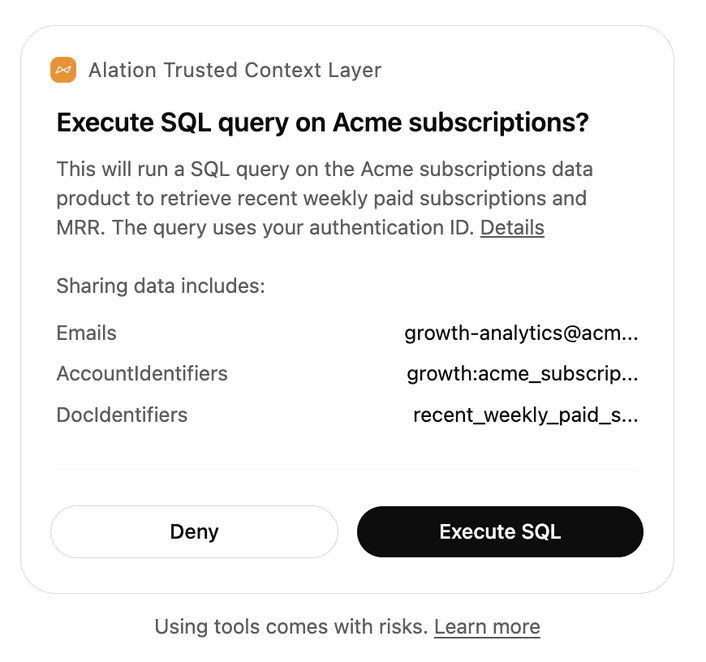
This matters especially for teams in regulated industries or with strict data access policies. The model never runs queries silently; every execution is a deliberate choice by a human in the loop.
Getting started
The Alation plugin for Codex is available today. Setup takes minutes and is documented in the guide below. If you're an analyst, you can be running governed queries in Codex by the end of day. If you're a data steward or admin, the guide covers how the plugin connects to your existing Alation instance and what permissions are required.
To start using these features today, read the setup guide.
- Active Data Governance
- Data Intelligence
- Digital Transformation
- Engineering
- Enterprise Data Catalog
- AI
- Alation News
- Data Governance
- Modern Data Stack
As a Senior Software Engineer at Alation, I contribute to the development of innovative solutions in Agentic AI development. My work focuses on MCP server and tools, AI agent memory, and agentic workflows for data domains. These efforts aim to refine the intelligence and efficiency of AI-driven solutions within Alation's ecosystem.
I hold a Master of Science degree in Software Engineering from Carnegie Mellon University, where I specialized in scalable systems and architectural design. My professional background includes positions at Kloudio and Alation, where I have built scalable infrastructure, enabled advanced cloud solutions, and supported the development of impactful data-driven tools. My expertise lies in Agentic AI development, architectural design, and cloud infrastructure.
Keep reading
More from the data desk