

Most comparisons of Alation and Microsoft Purview start with a feature matrix: governance here, compliance there, a row of green checkmarks for each. That's useful if you're filling out a spreadsheet. It's much less useful if you're trying to answer the question that matters: when you put real data, real architecture, and real users in front of this tool, does it hold up?
That's the question this guide answers. Microsoft Purview and Alation both compete for the same budget line in enterprise data governance, but they're built on different assumptions about what your data environment looks like… and that difference shows up fast once you move past the demo and into a proof-of-value exercise. Below, we'll walk through where each platform is strong, where Purview tends to break down in practice, what it actually costs, and what to test before you commit either way.
Microsoft Purview vs. Alation at a glance: Core architectural differences
The fastest way to understand the gap between these two platforms is to look at how and why each was built.
Purview was built as an extension of the Microsoft compliance and security stack.
Alation was built as a data catalog and intelligence layer designed to sit across whatever data stack you actually have, whether that includes Microsoft or not. Today, its evolved into the Alation Intelligence Operating System (AIOS): one platform spanning catalog, lineage, data quality, and governance to fuel trusted, accurate AI.
That architectural divergence is the reason these two tools tend to perform so differently once they leave the sales deck. A platform built around a single ecosystem will always be strongest inside that ecosystem's boundaries. The real question for most enterprise data leaders isn't whether Purview is good at what it does; it's whether your data estate is actually contained inside those boundaries today, and whether it will stay that way as your AI initiatives expand into tools, models, and data sources Microsoft doesn't own.
Alation vs. Microsoft Purview comparison: Architecture, lineage, pricing, and AI readiness
Dimension | Microsoft Purview | Alation |
Ideal environment | Microsoft/Azure-native stacks | Heterogeneous, multi-cloud, hybrid environments |
Metadata propagation across modern architectures (e.g., medallion/lakehouse) | Inconsistent outside Azure-native services 5,6 | Designed for cross-platform propagation |
Lineage depth | Strong for Power BI; drops off into Databricks, dbt, and non-Microsoft tools 5 | Consistent across 120+ connectors1 and cross-system hops |
Data quality | Data quality capability within Unified Catalog; newer, Azure-centric | Native Data Quality Agent, plus an open framework for third-party DQ tools |
On-premises connectivity | Supported via a self-hosted integration runtime you install and maintain7 | Native — deployable fully on-premises, with direct connectors to on-prem sources |
Primary users | Governance admins, security, and compliance teams | Business users and data teams, alongside governance and engineering |
Pricing model | Pay-per-governed-asset; scope drives monthly cost 3 | Platform-based pricing, with ROI driven by consolidation |
AI/Copilot readiness | Requires a separate context layer to be reliable | Active metadata feeds AI context natively |
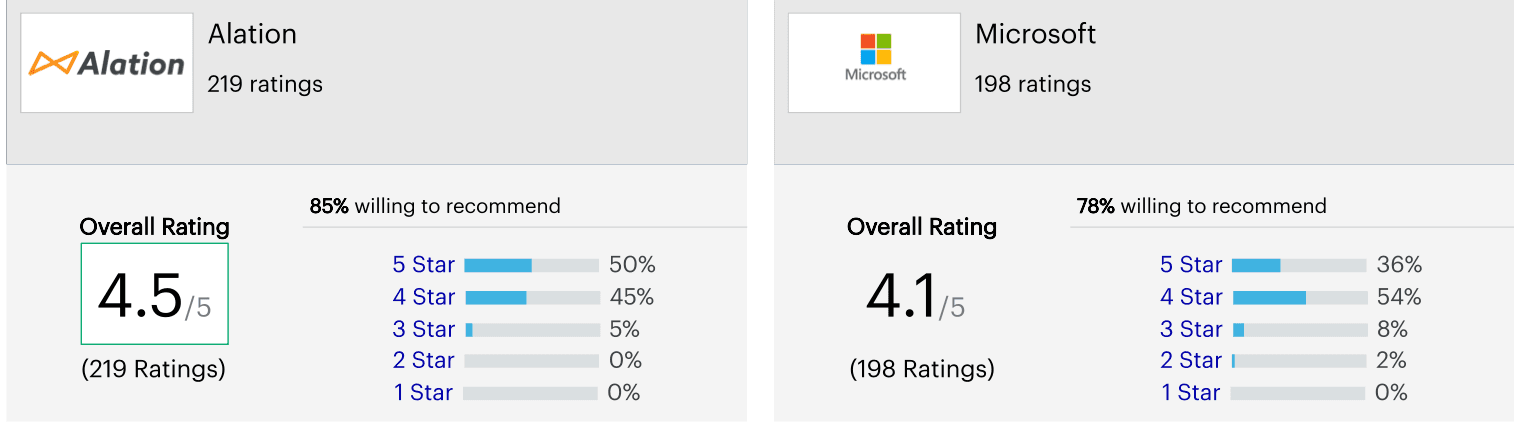
User ratings (Gartner Peer Insights, Metadata Management Solutions market) | 4.1 / 5 stars (198 reviews) 2 | 4.5 / 5 stars (220 reviews) 2 |
(Data shown above is recent as of publication date. Pricing and feature details shift quickly in this market; verify current figures at the GPI site and pair this table with our guide to evaluating data catalog software for a fuller checklist.)
Who actually uses each platform day to day?
The architectural gap above shows up in who each tool is actually built for.
Microsoft Purview is primarily optimized for technical governance, security, and compliance teams: the people configuring integration runtimes, scan rules, and sensitivity labels.
Alation places greater emphasis on business user adoption: intuitive natural-language search, collaboration, and rich business context sit alongside the governance and engineering tooling, not instead of it.
That's not a knock on Purview's audience, as compliance teams need exactly the tooling Purview gives them. But if the goal is getting business analysts, not just IT, to actually use and trust the platform day to day, that's a materially different design target worth asking each vendor about directly.
Where Microsoft Purview hits a wall: Patterns from real proof-of-value exercises
Feature lists tell you what a tool is supposed to do. Proof-of-value exercises tell you what it actually does once it meets your architecture. Here's what that looks like in practice.
Metadata doesn't always propagate across modern architectures
A growing number of enterprises run on medallion architectures: bronze, silver, and gold layers that incrementally clean and aggregate data as it moves through the pipeline. That structure is common, and it's exactly where governance tools either prove themselves or fall apart.
Microsoft's own Databricks lineage documentation5 confirms the gap directly: Purview doesn't natively support lineage for Unity Catalog external tables, and getting full lineage out of Databricks requires deploying a separate OpenLineage-based solution accelerator rather than a built-in capability.
A heterogeneous data environment is far from an edge case. It's the kind of architecture most enterprises running modern lakehouse patterns will eventually hit, and it's worth testing directly rather than taking on faith. Our breakdown of the four pillars of data lineage is a useful framework for structuring that test yourself.
“Free” doesn't mean free at enterprise scale
Purview is frequently the default choice in Microsoft-heavy accounts simply because it's already bundled in. But “included” and “adequate” aren't the same thing. Organizations using it for basic classification and discovery often find it works fine… right up until governance needs to scale across business units, data domains, and a growing AI footprint.
At that point, the tool that looked free on the license starts costing real time in workarounds, and real risk in governance gaps. (More on what this actually costs in dollars below.)
Stalled implementations create real cost, not just inconvenience
In Microsoft-centric accounts, Purview is often the “native” and assumed-cheaper option… until implementation stalls. Multiple independent evaluations6 of Purview note that its governance enforcement works natively inside Azure but requires custom connector and orchestration work outside it, which extends implementation timelines. Every month a governance program sits half-implemented is a month of unmanaged risk, ungoverned AI inputs, and frustrated data teams.
These patterns echo a broader sentiment we hear consistently from data leaders evaluating both tools: enthusiasm for the Microsoft ecosystem generally, paired with real frustration trying to bend Purview specifically into an enterprise-grade governance tool after months of effort.
Data quality and on-premises access come with extra infrastructure to run yourself
These two capabilities are worth stress-testing directly, since they're easy to underestimate in a demo.
Purview's data quality capability lives inside its Unified Catalog and is newest and strongest for Azure-native sources; extending it to on-premises data quality scanning requires setting up its own Kubernetes-based integration runtime. Alation's Data Quality Agent is agentic and native to the same platform used for cataloging and governance, with an Open Data Quality Framework available if you already have a third-party DQ tool you'd rather plug in.
On-premises sources follow the same pattern: Purview can reach them, but only through a self-hosted integration runtime, infrastructure you stand up and maintain yourself, on hardware Microsoft's own guidance puts at an 8-core, 28GB minimum7. Alation can be deployed fully on-premises or connect to on-prem sources directly, without a separate infrastructure layer to own. Neither gap is disqualifying on its own, but both add real implementation and maintenance cost that doesn't show up on the license page.
Where Microsoft Purview genuinely wins
Purview is a strong choice if your organization is fully committed to the Microsoft ecosystem. Native integration with Power BI, Microsoft 365, and Azure compliance tooling is deep and well-supported, and policy enforcement for Microsoft-native data is genuinely strong.
If your data estate lives almost entirely inside Azure and your roadmap doesn't include significant multi-cloud expansion, Purview's bundled pricing and ecosystem fit are legitimate advantages. The gap opens up specifically when data, tools, and teams extend beyond that boundary… which, for most enterprises today, they do.
This also doesn't have to be an either/or decision. Some organizations (particularly in regulated industries like healthcare and financial services) keep Purview in place for Microsoft-native compliance and security labeling, and layer Alation on top for catalog, business-user search, lineage, and AI-readiness across their full multi-cloud estate. That coexistence model is often more realistic than a full rip-and-replace, especially for teams that have already invested in a Purview deployment.
One caveat worth noting: full Microsoft-ecosystem lock-in isn't strictly required to get value from Alation either. Alation's Power BI integration within Microsoft Fabric already catalogs and traces the lineage of Fabric-hosted Power BI assets, so Microsoft-heavy teams aren't forced to choose one governance layer over the other for their BI stack.
The AI context gap: How your catalog impacts AI outcomes
This is the part of the evaluation most comparison guides skip entirely, and it's quickly becoming the most important one.
Enterprises rolling out Copilot, internal AI agents, or any LLM-powered tool for their enterprise keep hitting the same wall: the AI can write a fluent query, but it doesn't understand what your internal fields actually mean. It doesn't know that “net_rev_adj” means something specific to your finance team, or that a “closed” status in one system means something different than “closed” in another.
This is much more than a model problem; it's a missing-context problem.
What is active metadata, and why does it matter for AI? Active metadata is metadata that doesn't just describe a table, but actively feeds the systems (human and AI) that depend on understanding it correctly. Data governance for AI only works if the AI layer has access to business context, not just schema. Purview's classification and compliance tooling was built around protecting and labeling data, not making it semantically legible to an AI system. That's a meaningfully different job, and it shows up the moment you ask either platform to support an actual AI initiative rather than a compliance checkbox.
This is also where a data marketplace approach matters: packaging governed data as discoverable, well-documented data products (for human and AI consumers alike) does more for AI reliability than classification alone ever will. And it's why data quality and lineage can't be treated as separate workstreams from your AI rollout; they're the foundation it's built on.
Alation's answer to this: Semantic Model Mastering
Every major data platform (including Snowflake, Power BI, Databricks) now maintains its own semantic layer, each defining metrics, dimensions, and business terms within its own boundary. For enterprises running several of these platforms at once, that produces a familiar problem: sprawling, inconsistent definitions with no single source of truth, and AI features that inherit whatever gaps and contradictions sit underneath them.
Alation's Data Products Marketplace addresses this directly through Semantic Model Mastering: cataloging semantic models from any platform, governing them centrally as data products — with ownership assignment, approval workflows, and version control — and syncing enriched definitions back to the source systems that consume them. It's the same governance pattern master data management brought to customer and product records, now applied to the semantic layer. Alation is a launch partner, alongside Snowflake, for the Open Semantic Interchange (OSI) standard this capability is built on.
This is the concrete version of the "no rewrite required" claim in the table above: rather than replacing the semantic models already built into Snowflake, Power BI, or other BI tools, Alation masters and governs them where they already live, then pushes governed definitions back out.
If this pattern sounds familiar (an AI pilot that stalled because the tool didn't understand your business terms) it's worth running a structured gap assessment before your next AI initiative, not after it's already underway.
What does Microsoft Purview pricing actually cost?
Purview's pricing looks simple on the license page and gets more complicated the moment you try to budget for it at enterprise scale. Because this is one of the most common points of confusion in a Purview evaluation, it's worth breaking out on its own.
Is Microsoft Purview actually free? No, not in any way that holds up at scale. Purview is often bundled with existing Microsoft/Azure licensing, which makes it look free at the outset. In practice, it uses a pay-per-governed-asset model3, so cost scales directly and continuously with how much of your data estate you bring under governance.
That structure creates a few predictable cost patterns worth planning around:
Cost scales with governance scope, not with value delivered. The more of your data estate you actually govern, the more you pay, which can quietly incentivize teams to under-scope governance just to control cost, the opposite of what a governance tool should encourage. Microsoft's own pricing documentation4 confirms that governing data in AWS or GCP can incur additional charges for data transfers and API calls beyond the standard per-asset fee.
Non-Azure sources cost more to govern well. Coverage of AWS, GCP, Databricks, and other non-Microsoft platforms typically requires additional connector work 4, which adds implementation cost on top of the per-asset licensing.
“Included” licensing hides the real total cost of ownership. Basic classification and discovery may be covered under an existing Microsoft 365 or Azure agreement, but scaling to enterprise-wide governance, AI-context readiness, and multi-cloud lineage typically requires additional Purview capabilities, each with its own cost dimension.
Stalled implementations are a hidden cost line. A governance program that takes significantly longer than planned to reach production status 6 is not a sunk cost you can walk away from — it's an ongoing spend on a tool that isn't yet delivering governance value.
The practical takeaway: don't evaluate Purview pricing off the license page alone. Model total cost of ownership against your actual data estate (including non-Azure sources) and ask for a real deployment timeline before you commit.
How to evaluate Alation vs. Microsoft Purview for your organization
Skip the vendor demo conclusions and test these directly:
Propagate metadata across your real architecture, not a sample dataset. If you run a medallion or lakehouse pattern, test classification propagation end-to-end before assuming it works.
Check lineage depth past your primary cloud's native tools. Power BI lineage looks great in every demo. Ask what happens when you trace lineage into dbt, Databricks, or a non-Microsoft warehouse.
Test AI-tool accuracy with and without catalog context. Give Copilot or your internal AI agent a business question with no curated context, then again with governed metadata behind it. The gap tells you everything.
Get a real timeline-to-value commitment, not a roadmap. Ask for reference customers who can speak to actual implementation timelines, not target dates.
FAQ: Alation vs. Microsoft Purview
Does Microsoft Purview work well with non-Microsoft data sources? Purview's strongest capabilities are concentrated in Azure-native services and Microsoft 365. Coverage of AWS, GCP, Databricks, and other non-Microsoft platforms typically requires additional connector work 4 and tends to deliver shallower lineage and classification than Microsoft-native sources.
What's the core difference between Alation and Purview for data governance? Purview approaches governance primarily through compliance, classification, and information protection inside the Microsoft ecosystem. Alation approaches governance as a data intelligence layer built to work across any combination of clouds and platforms, with collaboration and active metadata as core design principles rather than add-ons.
Which tool is better for AI and Copilot readiness? Neither tool's AI features matter much without governed, business-contextualized metadata underneath them. Alation's active metadata approach is built specifically to feed that context to AI systems; Purview's classification tools were designed primarily for compliance and protection, which solves a different problem than AI context.
Can Alation and Microsoft Purview be used together? Yes — some organizations run Purview for Microsoft-native compliance and security labeling while using Alation as the primary catalog and governance layer across their full multi-cloud estate. Whether that's worth the added complexity depends on how much of your data lives outside Azure.
How long does it take to implement Alation vs. Microsoft Purview? Implementation timelines vary by environment complexity for both platforms, but they're worth asking about directly rather than assuming. Independent evaluations6 note that Purview rollouts extending beyond core Azure services often take longer to reach production governance than Azure-native ones. Ask any vendor for reference timelines from organizations with an architecture similar to yours, not generic averages.
Choosing the right path forward
Microsoft Purview makes sense for organizations fully inside the Microsoft ecosystem with no near-term plans to expand beyond it. For everyone else (multi-cloud teams, organizations running modern lakehouse architectures, and any team trying to make AI initiatives actually work), the gap between “native” and “enterprise-ready” tends to show up fast, usually right in the middle of a PoV.
Curious to go deeper? Book a demo with us today.
Sources & Notes
Every external claim on this page is independently verifiable. The public sources are listed here.
1. Alation lists 120+ pre-built connectors. — Alation ↗
2. Gartner Peer Insights, Metadata Management Solutions market: Alation 4.5 stars/220 reviews, Microsoft 4.1 stars/198 reviews. — Gartner Peer Insights ↗
3. Microsoft Purview Unified Catalog pricing is pay-as-you-go per governed asset, prorated daily. — Microsoft Azure ↗
4. Governing non-Azure data (AWS, GCP) in Purview may incur additional data-transfer/API charges. — Microsoft Azure ↗
5. Microsoft Purview does not natively support lineage for Azure Databricks Unity Catalog external tables. — Microsoft Learn ↗
6. Independent evaluation: Purview enforces natively inside Azure but requires custom connector/orchestration work outside it, extending implementation timelines. — Promethium ↗
7. Scanning on-premises sources in Purview requires a self-hosted integration runtime, recommended minimum 8-core/28GB machine, that the customer installs and maintains. — Microsoft Learn ↗
- Active Data Governance
- Data Intelligence
- Digital Transformation
- Engineering
- Enterprise Data Catalog
- AI
- Modern Data Stack
- Data Governance
- Data Catalog
- Cloud Transformation
Keep reading
More from the data desk