
Data Products App
Alation Cloud Service Applies to Alation Cloud Service instances of Alation
Overview
The Data Products App enables organizations to create curated, reusable data products and make them available to data consumers through the Marketplace.
Using data products represents a shift in how data is managed and consumed. Instead of cataloging data assets (collecting and documenting them), this approach focuses on strategically designing data products: trusted, high-quality data listings built to solve specific business problems and deliver measurable outcomes. The Data Products App reframes the catalog from a system-centric view to a use-case-driven model that prioritizes impact.
As AI-powered interfaces, such as chatbots and natural language query tools, become more common, data products may start playing a critical role in enabling AI-driven data consumption. They can provide the trusted, well-governed, and context-rich data that AI agents need to deliver accurate and useful results. Having a foundation of clearly defined, high-quality data products ensures that both business and technical users can access and understand data more easily.
See also: Data Products FAQ.
Key Concepts in the Data Products App
The Data Products App introduces a structured approach to managing and consuming data by defining clear roles, responsibilities, and components within the data product ecosystem.
Data asset—Any resource that contains usable data and serves as a building block of a data product. In the context of data products, assets can take various forms, such as database tables, APIs, file-based datasets (Parquet, CSV), or streaming data sources.
Data product—A reusable, well-defined data asset or a group of data assets designed to solve specific business problems or support targeted outcomes. It is a packaged, ready-to-use offering: structured, governed, and made accessible for a broad range of users, including analysts, business stakeholders, and AI systems. Data products have a designated owner who is responsible for data quality, access management, and ongoing updates.
Data product definition—A specification that describes what data is included, how to access it, how it should be used, and any applicable usage restrictions (such as licensing or regulatory requirements). Each data product is defined in a YAML file, which is then published to the Marketplace for others to discover and use.
Data Products Marketplace—A central location for publishing and discovering data products that allows sharing trusted and reusable data products at scale and enables both human users and AI agents to discover data confidently. By surfacing certified and curated data products in a single location, the Marketplace helps reduce time-to-insight from your data assets.
Data producers—Individuals or teams that provide and manage the data used in a data product.
Data consumers—Human users or AI systems that discover and use data products to support analysis, decision-making, automation, and applications.
Get Started with the Data Products App
The Data Products App is available on Alation Cloud Service instances in the New User Experience only.
The app is disabled by default.
To get started:
Reach out to your Account Manager for pricing details.
Once enabled, the Data Products App becomes visible in the Alation user interface and accessible from the left-side navigation panel.
Important
Before all users can begin using the app, a designated configurator must set it up by creating the Marketplace. No Marketplaces exist by default.
Access the Data Products App
To access the Data Products App, click the Data Products icon in the left navigation bar. The icon is visible to users with Composer access or higher, excluding the Explorer and Viewer roles.
When you open the App, you see either the Marketplace page (if it’s configured) or the Marketplace configuration page (if it isn’t). In most cases, an admin user will have already configured the Marketplace and published data products before other users start accessing the App. As a result, most users start their journey by accessing and exploring the Marketplace.
The screenshot below shows an example of a configured Marketplace, offering a selection of data products for data consumers to explore.
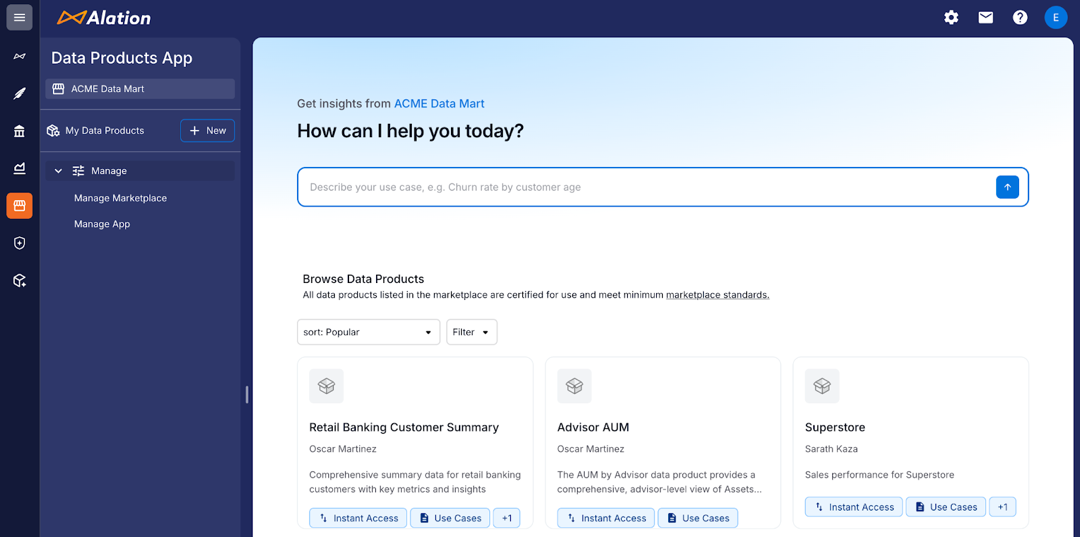
What you can see and do in the Data Products App depends on your Alation role and your permissions within the app. The Data Products App has its own administrators who grant access to specific features and data products based on your role. For more information on the Data Products App permissions, refer to Configure Access in the Data Product App.
What’s Next?
To begin using and managing the Data Products App, see:
Data Products API Access
The Data Products App includes a dedicated public API. You can find the Data Products API documentation on Alation’s Developer Portal.