
Alation Agent
Alation Cloud Service Applies to Alation Cloud Service instances of Alation
The Alation Agent (or simply the Agent) is optional software you can install on your network to securely connect Alation Cloud Service to your on-premises data sources. After connecting the Agent to data sources that are behind your firewall, you can securely catalog metadata from those data sources to your Alation Cloud instance.
When considering use of the Agent, keep in mind the following:
Each Alation Cloud Service instance can support multiple Agents in different geographical locations, network segments, or security zones.
Each Agent can support multiple connectors and data sources.
The Agent only works with connectors based on the Open Connector Framework (OCF). It doesn’t support native or custom DB connectors.
The Agent supports RDBMS, BI, and file system connectors.
Newer versions of the Alation Agent now support Compose. See Compose Compatibility below for more details.
The Agent supports the Query Service Add-on for the Zero Data feature, which enables on-premises query execution and data profiling with results stored in your own object store. See Query Service Compatibility below for more details.
This page includes information about:
Agent System Requirements
Alation recommends running the Agent on a dedicated physical or virtual Linux machine with no other software installed. A virtual machine can be set up in a shared server environment as long as the required CPU, RAM, and HDD are allocated for the Agent.
You can install multiple Agents, each on its own machine, and connect them all with Alation Cloud Service. This may be needed if you have data sources in different geographical locations, network segments, or security zones.
Operating System
The Alation Agent is supported on the following Linux operating systems. The Agent is not supported on Windows operating systems.
Supported Operating System |
Alation Agent Version |
|---|---|
AWS Linux 2 |
All versions |
AWS Linux 2023 |
1.8.10.5177 and later |
CentOS 7.x (x86 64-bit) |
All versions |
Debian 9 |
All versions |
Debian 10 |
All versions |
Debian 11 |
1.5.0.2541 and later |
Fedora 33 |
All versions |
Fedora 34 |
All versions |
Oracle Linux 7 (on Red Hat Compatible Kernel) |
All versions |
Oracle Linux 8 (on Red Hat Compatible Kernel) |
All versions |
Oracle Linux 8.5 (on Red Hat Compatible Kernel) |
All versions |
Red Hat 7.x (x86 64-bit) |
All versions |
Red Hat 8.x (x86 64-bit) |
All versions |
Red Hat 9.x (x86 64-bit) |
1.5.0.2541 and later |
Ubuntu 16 |
All versions |
Ubuntu 18 |
All versions |
Ubuntu 20 |
All versions |
Ubuntu 22 |
1.5.0.2541 and later |
Ubuntu 24 |
1.7.8.5066 and later |
Hardware
The hardware requirements for the Agent depend on how many objects per data source you will be cataloging. Larger data sources require more hardware resources.
The Agent has been certified on the following hardware at the specified scale. For cases with more objects, connectors, or Agents, contact Alation.
Small Deployment |
Large Deployment |
||
|---|---|---|---|
Scale |
# of objects per data source |
5 Million |
15 million |
# of Agents per Alation instance |
5 |
5 |
|
# of connectors per Agent |
5 |
10 |
|
System Component Requirements |
CPU |
2 or more cores 2.5-3.1 GHz |
4 or more cores 2.5-3.1 GHz |
RAM |
8 GB |
16 GB |
|
HDD |
20 GB |
40 GB |
|
The number of Agents per Alation instance may apply if you have data sources in different geographical locations, network segments, or security zones and need to install and connect multiple Agents to your Alation Cloud Service.
Alation Cloud Service Compatibility
In the table below, find the version of Alation you’re currently using. To get the latest Alation Agent features and fixes, we recommend upgrading to the latest version of the Alation Agent that’s compatible with your version of Alation Cloud Service.
Alation provides downloads for the latest two versions of the Alation Agent on the Customer Portal. Older versions of the Agent will become unavailable as newer versions are released.
Alation Agent Version |
Compatible Versions of Alation Cloud Service |
|---|---|
1.10.0.7491 |
2026 latest version |
1.8.16.6859 |
2026 latest version |
1.8.15.6292 |
2025.3.4, 2026 latest version |
1.8.15.5840 |
2025.1.1, 2025.1.2, 2025.1.3, 2025.1.4, all versions of 2025.3.x, all versions of 2026.x.x |
1.8.14.5626 |
2025.1.1, 2025.1.2, 2025.1.3, 2025.1.4, 2025.1.5, 2025.3 |
1.8.13.5270 |
2025.1.1, 2025.1.2, 2025.1.3, 2025.1.4 |
1.8.12.5253 |
2025.1.1, 2025.1.2, 2025.1.3, 2025.1.4 |
See the Alation Agent Version History page for a full listing of historical Agent releases and compatible Alation Cloud Service versions.
Checking the Agent Version
On the Agent host machine, check the installed Agent’s version by running:
hydra version
The version number will be in the first line of the output.
Compose Compatibility
Compose Compatibility with the Agent
In order to use Compose with the Alation Agent, you must:
Be on Alation Cloud Service version 2022.4 or later.
Have Alation Agent version 1.2.1.868 or newer installed. Agent version 1.2.0.815 does not support Compose.
Have a supporting version of the relevant connector installed on the Agent. See the documentation for individual OCF connectors to find out if a particular connector can connect to Compose through the Alation Agent.
Query Service Compatibility
Query Service Add-on Compatibility with the Agent
In order to use the Query Service Add-on (Zero Data) with the Alation Agent, you must:
Be on Alation Cloud Service version 2026.1 or later.
Have the latest compatible version of the Alation Agent installed. See the Agent Release Notes for version details.
Have a supported object store (AWS S3 or Azure Blob Storage) configured.
Ensure the user’s browser can reach the Agent’s Zero Data ingress endpoint directly.
See Query Service Add-on for more information.
Zero Data Support Matrix
The Query Service Add-on uses a K3s-based runtime that has tighter requirements than the standard Alation Agent. The matrix below shows which Agent host configurations support Zero Data.
Note
Red Hat Enterprise Linux is the only operating system that is currently tested with the K3s-based Zero Data runtime. Other RHEL-family distributions (AWS Linux, Oracle Linux, CentOS) are expected to work because they use the same RPM and kernel toolchain, but they aren’t part of the regular test matrix yet. If you need a guarantee for a specific distribution, contact Alation Support.
Operating System Support
Host Operating System |
Zero Data Support |
Notes |
|---|---|---|
Red Hat Enterprise Linux 8.x (x86_64) |
Supported |
RPM-based install with the |
Red Hat Enterprise Linux 9.x (x86_64) |
Supported |
RPM-based install with the |
AWS Linux 2 (x86_64) |
Supported |
RPM-based install with the |
AWS Linux 2023 (x86_64) |
Supported |
RPM-based install with the |
Oracle Linux 8 / 8.5 (Red Hat-compatible kernel) |
Supported |
RPM-based install with the |
CentOS 7.x (x86_64) |
Supported |
RPM-based install with the |
Debian 9 / 10 / 11 |
Not supported |
The K3s-based |
Ubuntu 16 / 18 / 20 / 22 / 24 |
Not supported |
The K3s-based |
Fedora 33 / 34 |
Not supported |
The |
Installation Mode Support
Installation Mode |
Zero Data Support |
Notes |
|---|---|---|
Root install on a supported RHEL-family OS |
Supported |
Default and recommended mode. |
Rootless install |
Not supported |
The |
Air-gapped (no outbound internet) |
Supported with caveats |
All K3s container images ship inside the |
Note
Air-gapped installations succeed only if the Agent host can reach an OS package repository (internal mirror) for system dependencies such as iptables. If the host is fully air-gapped with no local repository configured, yum install may fail when a system dependency isn’t already present. Pre-install the required system packages, or configure access to an internal package mirror before running the installer.
Architecture Support
CPU Architecture |
Zero Data Support |
Notes |
|---|---|---|
x86_64 |
Supported |
All Zero Data packages are built for x86_64. |
ARM (aarch64) |
Not supported |
Zero Data packages aren’t built for ARM. |
Object Store Support
Object Store |
Zero Data Support |
Notes |
|---|---|---|
AWS S3 |
Supported |
Authentication through IAM role on the Agent host or IAM user with access keys. |
Azure Blob Storage |
Supported |
Authentication through OIDC federated credential (Microsoft Entra ID). |
Google Cloud Storage |
Not supported |
Not yet implemented. |
On-premises S3-compatible (MinIO, Ceph) |
Not supported |
Not yet implemented. |
Hardware Requirements
The Zero Data Agent package adds K3s, the Query Service container, the Traefik ingress gateway, the JWT gateway, and the Zero Data healthcheck service to the Agent host. Provision additional resources on top of the standard Agent baseline:
Component |
Additional CPU / RAM |
Notes |
|---|---|---|
K3s control plane |
1 core / 1 GB RAM |
Single-node cluster managed by the Agent. |
Query Service |
1 core / 2 GB RAM |
Scales with concurrent query and sampling workload. |
Traefik ingress |
0.5 core / 256 MB RAM |
Terminates TLS for the user-facing ingress endpoint. |
Healthcheck service |
0.25 core / 128 MB RAM |
Reports K3s pod and ingress status to Alation Cloud Service. |
For overall sizing, add these to the small or large hardware footprints in Hardware above.
If you need a configuration that isn’t listed as supported, contact Alation Support.
Architecture
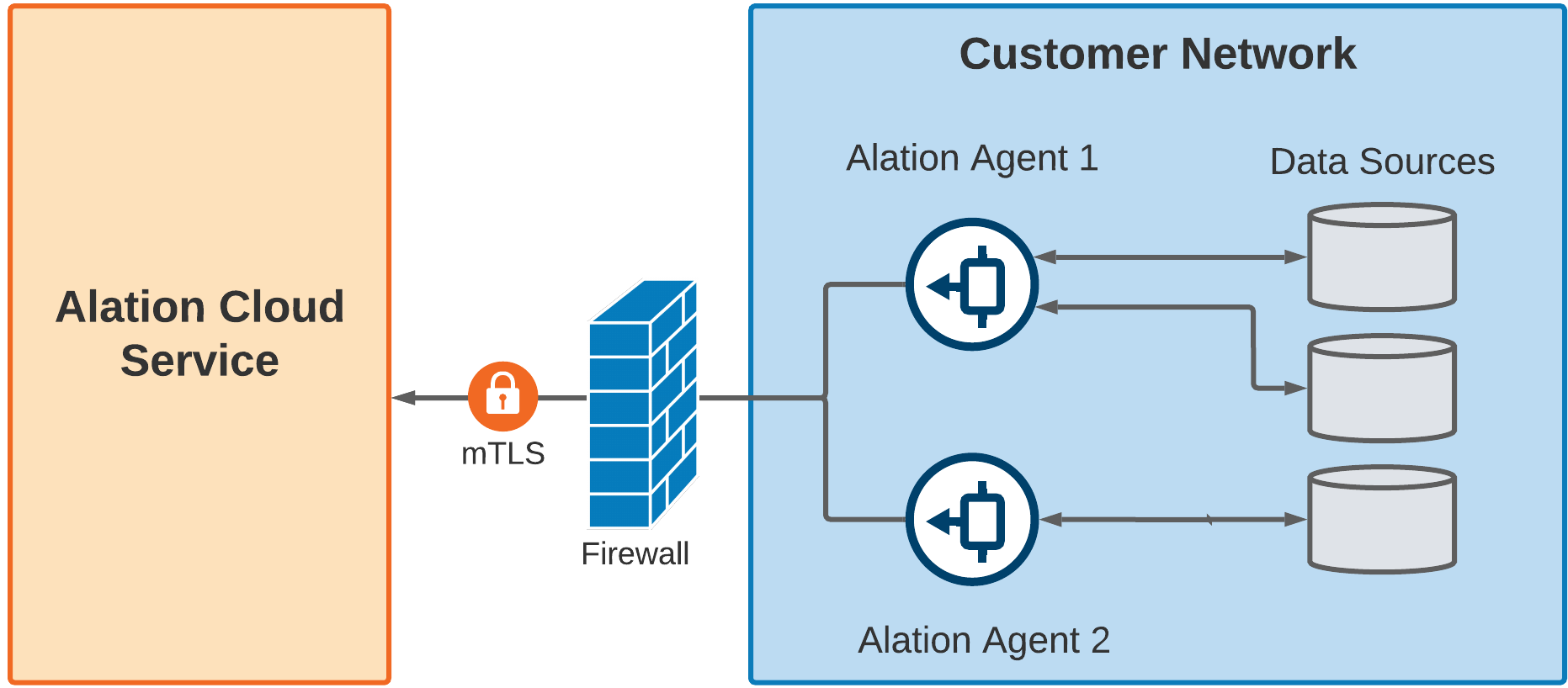
The Alation Agent is installed within your network and connects to the data sources as well as Alation Cloud Service. To connect to your data sources, the Agent uses connectors based on the Open Connector Framework (OCF).
Each Alation Cloud Service instance can support multiple Agents in different geographical locations, network segments, or security zones.
Each Agent can support multiple connectors and data sources.
Security
Alation designed the agent to comply with security policies that only allow outbound connections. It uses mutual TLS and end-to-end encryption to secure communications between the Agent and Alation Cloud Service. Once the connection is established, Alation Cloud Service can securely send requests to the Agent.
The Agent is stateless and doesn’t store any customer information.
Establishing a Secure Connection
Alation uses digital certificates to provide end-to-end encryption between the Agent and Alation Cloud Service. After installing the Agent software in your network, you’ll generate a certificate signing request (CSR) on the Agent machine. You then upload the certificate signing request to the Alation Cloud Service. Alation Cloud uses the CSR to create a TLS certificate that is used to establish a trusted relationship between the Agent and Alation Cloud Service. You’ll install this TLS certificate on the Agent to finalize the trusted connection.
Alation uses the AWS Certificate Manager (ACM) Private Certificate Authority for generating all Agent certificates. ACM is a highly-available private certificate authority service. Using ACM as the root certificate ensures that only certificates generated from that certificate authority can establish trusted communication with the Alation Cloud Service.
You can renew or revoke the certificate at any time. See Work with the Agent’s Certificates.
Once the required certificate is in place, the Agent will initiate an outbound TLS v1.3 connection to Alation Cloud Service. The Agent and Alation Cloud Service will mutually authenticate.
Alation Cloud Service validates that the Agent’s certificate was signed by the ACM Private Certificate Authority.
The Agent validates Alation Cloud Service’s certificate authority trust chain, the certificate’s expiration and revocation status, and the ID of your Alation Cloud instance.
Continuing Communication
This TLS connection ensures that all subsequent communication is fully encrypted and allows Alation Cloud Service and the Agent to transfer metadata during metadata extraction and query log ingestion. The connection is persistent, so future queries or extraction requests can be executed immediately.
If network interruptions ever break the connection between the Agent and your Alation Cloud instance, the Agent will attempt to reconnect. It keeps trying to connect using an exponential backoff algorithm. Once the Agent can connect to your Alation Cloud instance again, it will reauthenticate and reestablish a secure connection.
Any jobs, such as metadata extraction, that were underway will automatically restart as long as the connection is reestablished within 30 seconds. If it takes longer than that, you’ll have to restart the job manually.
Further Reading
Explore the following topics for more help with the Alation Agent:
- Agent Release Notes
- Install the Alation Agent
- Configure the Alation Agent
- Work with the Agent’s Certificates
- Upgrade the Agent
- Delete and Reconnect the Agent in Alation
- Uninstall and Reinstall the Agent Software
- Start and Stop the Agent
- Troubleshoot the Agent
- Alation Agent Version History
- Authentication Service Add-on
- Query Service Add-on