
Qlik Sense OCF Connector: Overview
Alation Cloud Service Applies to Alation Cloud Service instances of Alation
Customer Managed Applies to customer-managed instances of Alation
Core Connector Core connectors are included with all Alation platform tiers (subject to each tier’s connector limits) and are fully supported by Alation.
The OCF Connector for Qlik Sense was developed by Alation and is available out of the box.
To download the Qlik Sense OCF connector package, go to the Alation Connector Hub available from the Customer Portal. Go to Customer Portal > Connectors > Alation Connector Hub. Only Alation users with access to the Customer Portal can access the Alation Connector Hub. If you don’t have access to the Customer Portal, contact Alation Support.
This connector should be used to catalog Qlik Sense as a BI source in Alation. It extracts Qlik Sense objects such as Streams, Applications and Sheets. Users will be able to search and find Qlik Sense objects, curate Qlik Sense object pages, and explore measures and dimensions from the Alation user interface.
Team
The following administrators are required to install this connector:
Alation Server Admin:
Installs the connector
Creates a Qlik Sense BI source
Provisions Alation API tokens
Qlik Sense administrator with the RootAdmin privilege:
Creates and exports the certificates.
Scope
The table below shows what features are covered by the connector.
Feature |
Scope |
Availability |
|---|---|---|
Qlik Sense |
Catalog a Qlik Sense instance as a BI source |
Yes |
Streams |
Extract streams |
Yes |
Filter streams |
Ability to include or exclude specific streams |
Yes |
Container |
Ability to catalog Container objects |
Yes |
KPI |
Ability to catalog KPI object |
Yes |
Dates |
Ability to catalog Date object |
Yes |
Applications |
Catalog applications in a stream |
Yes |
Filter applications |
Ability to include or exclude specific applications. |
Yes |
Filter pane objects |
Ability to include or exclude cataloging of Filter pane objects. Filter pane labels are not cataloged. |
Yes |
Sheets |
Catalog sheets in an application |
Yes |
Filter sheets |
Ability to include or exclude certain sheets |
No |
Sheet objects, dimensions, measures, and expressions |
Catalog dimensions, measures and measures expressions of a sheet object |
Yes |
Auto-generated sheet object titles |
Ability to capture auto generated sheet object titles in Qlik Sense |
No |
Data sources |
Ability to catalog data sources |
Yes |
Master items |
Ability to catalog master items |
Yes* |
Tables |
Ability to catalog tables |
Yes* |
Table Columns |
Ability to catalog table columns |
Yes* |
Image previews |
Ability to preview thumbnail images of sheet objects |
No |
Source comments |
Ability to extract source comments for sheets and apps |
Yes |
Lineage |
Ability to generate lineage for the BI source |
Yes |
Cross-System lineage |
Ability to generate lineage between the BI source and a data source |
No |
* Supported from Qlik Sense OCF Connector version 1.4.0 and later.
Limitations
As Qlik Sense API currently does not return the host and port information of upstream data sources, Alation is unable to support cross-system lineage.
The connector parses the field names and expressions for the associated Sheet objects from the JSON response. The connector parses most of the information; however, some information might be lost in some cases.
Qlik Sense Object Hierarchy
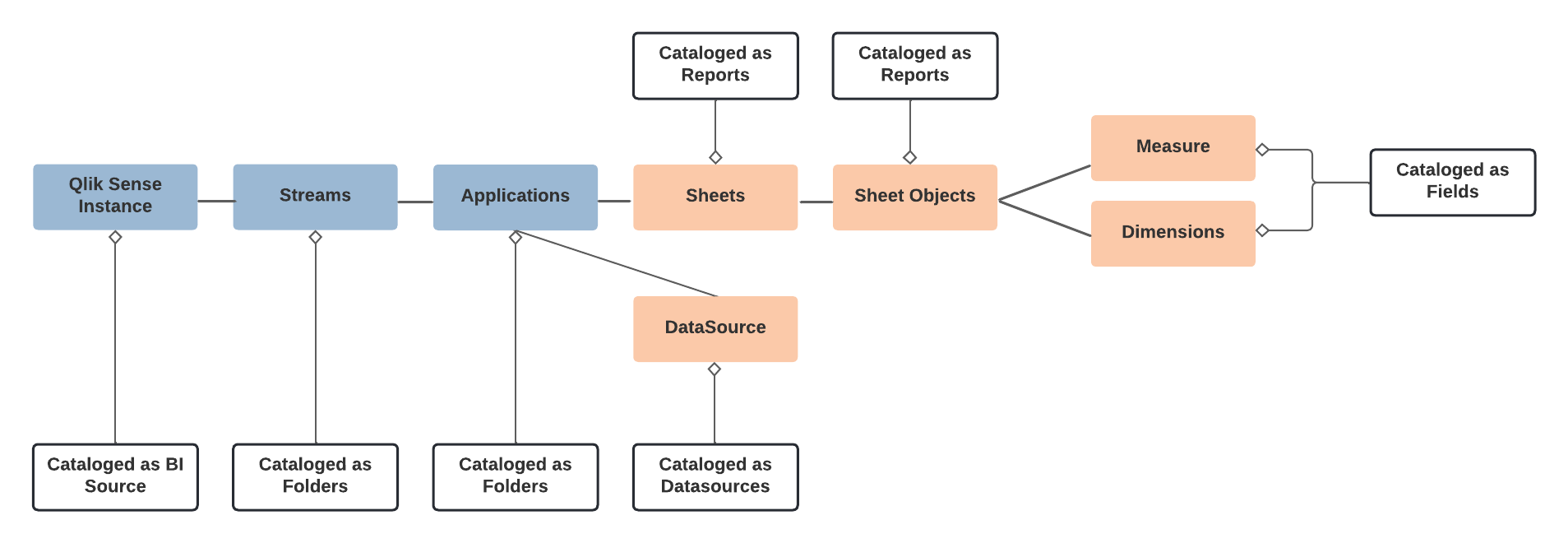
The following diagram shows the hierarchy of Qlik Sense objects and how they are cataloged in Alation:
Qlik Sense API Methods
The table below lists the Qlik Sense API methods used by this connector to extract metadata from the Qlik Sense server:
Type |
API Methods |
Description |
|---|---|---|
Stream |
GetDocList |
Gets the list of applications which includes streams from Qlik. |
Application |
GetDocList |
Gets the list of applications which includes streams from Qlik. |
Sheets |
OpenDoc CreateSessionObject GetLayout |
Every time when the application is opened, a session is created and the information is returned. |
Sheets Objects |
GetObject GetFullPropertyTree |
GetObject gets basic sheet information. GetFullPropertyTree produces a JSON object with all information. |
Sheet object dimensions, measures, expressions |
GetFullPropertyTree |
Gets each sheet object, its dimensions, measures, and expressions |
DataSources |
GetConnections GetLineage |
GetConnections returns all connections used by the application. GetLineage can be used to tie an application to a set of data sources. |
Master Items (Measures and Dimensions) |
OpenDoc CreateSessionObject {DimensionList} |
Gets a list of master columns from a specific app. Generates a mapping for master dimensions to a sheet using the definition of the sheet object’s column. |
Tables, Table Columns |
GetTablesAndKeys or
|
Gets a list of tables and table columns from a specific app.
GetTablesAndKeys is used only when the Enable Cloud
Integration option is disabled on the Connector Settings
page. When this option is enabled, the data is extracted from
the Lineage Graph API using |
Refer to App API for more information.
Qlik Sense Cloud APIs
The table below lists the Qlik Sense Cloud API endpoints used by this connector to extract lineage:
Note
The following APIs are used only when Qlik Cloud Integration is enabled.
Type |
Category |
API Endpoint |
Description |
|---|---|---|---|
Token (OAuth M2M) |
Authentication |
|
Qlik Sense cloud authentication to get a token. Request body includes |
Items API |
Cataloging |
|
This endpoint is used to get the QRIs for each app within the specified space. |
Lineage Graph API |
Cataloging and Lineage Mappings |
|
Catalog tables, table columns, QVDs, and other datasets in the application. It provides the lineage mappings between those objects. |