Set Up AWS S3 Private Link
Alation Cloud Service Applies to Alation Cloud Service instances of Alation
Customer Managed Applies to customer-managed instances of Alation
Core Connector Core connectors are included with all Alation platform tiers (subject to each tier’s connector limits) and are fully supported by Alation.
Prerequisites
Important
From connector version 3.10.2 or newer, Alation supports private link connectivity for the same region. Therefore, ensure that the region in which Alation is hosted and the end user bucket is in the same region. For example, if the Alation instance is hosted in the us-east-1 region, you can establish the private link connectivity for buckets residing only in that region.
To configure private link for S3, perform the following configurations in Amazon S3 and Alation:
Configure Private Link in Amazon S3
Contact Alation Support to configure a private link for the region in which your inventory and source buckets reside. Alation provisions a VPC gateway endpoint to establish private connectivity between Alation Virtual Private Cloud and the end-user bucket.
Once the private link is configured, add either of the following permissions in the inventory and source buckets to establish a connection using the private link.
Note
Update your existing policy to contain
"Sid": "Access-to-specific-VPCE-only"and the rest of the policy should remain unchanged.The following Amazon S3 bucket policy allows access to a specific bucket from only the VPC endpoint
vpce-1a2b3c4d: DOC-EXAMPLE-BUCKET2. The policy denies all access to the bucket if the specified endpoint is not in use. Theaws:sourceVpcecondition specifies the endpoint and doesn’t require an Amazon Resource Name (ARN) for the VPC endpoint resource, only the endpoint ID. To use this bucket policy, replaceDOC-EXAMPLE-BUCKET2andvpce-1a2b3c4dwith your bucket name and endpoint.Before using the following example policy, replace the VPC endpoint ID with an appropriate value from your use case to access your bucket.
{
    "Version": "2012-10-17",
    "Id": "Policy1415115909152",
    "Statement": [
        {
        "Sid": "Access-to-specific-VPCE-only",
        "Principal": "*",
        "Action": [
            "s3:ListBucket",
            "s3:GetObject"
        ],
        "Effect": "Allow",
        "Resource": [
            "arn:aws:s3:::DOC-EXAMPLE-BUCKET2",
            "arn:aws:s3:::DOC-EXAMPLE-BUCKET2/*"
        ],
        "Condition": {
            "StringEquals": {
            "aws:sourceVpce": "vpce-1a2b3c4d"
            }
        }
        }
    ]
}
Note
This policy restricts console access to the specified bucket, as console requests don’t originate from the specified VPC endpoint.
{
    "Version": "2012-10-17",
    "Id": "Policy1415115909152",
    "Statement": [
        {
        "Sid": "Access-to-specific-VPCE-only",
        "Principal": "*",
        "Action": [
            "s3:ListBucket",
            "s3:GetObject"
        ],
        "Effect": "Deny",
        "Resource": [
            "arn:aws:s3:::DOC-EXAMPLE-BUCKET2",
            "arn:aws:s3:::DOC-EXAMPLE-BUCKET2/*"
        ],
        "Condition": {
            "StringNotEquals": {
            "aws:sourceVpce": "vpce-1a2b3c4d"
            }
        }
        }
    ]
}
Configure Private Link for S3 in Alation
If Alation Support provisions the standard Amazon S3 VPC gateway endpoint for your region, no additional changes are needed in Alation. After Alation Support confirms that the gateway endpoint is ready, go to the General Settings tab of your Amazon S3 file system source, and test the connection. For details on configuring the General Settings, see Configure Connection to File System Source.
Configure Private Link with a Custom Interface VPC Endpoint (Optional)
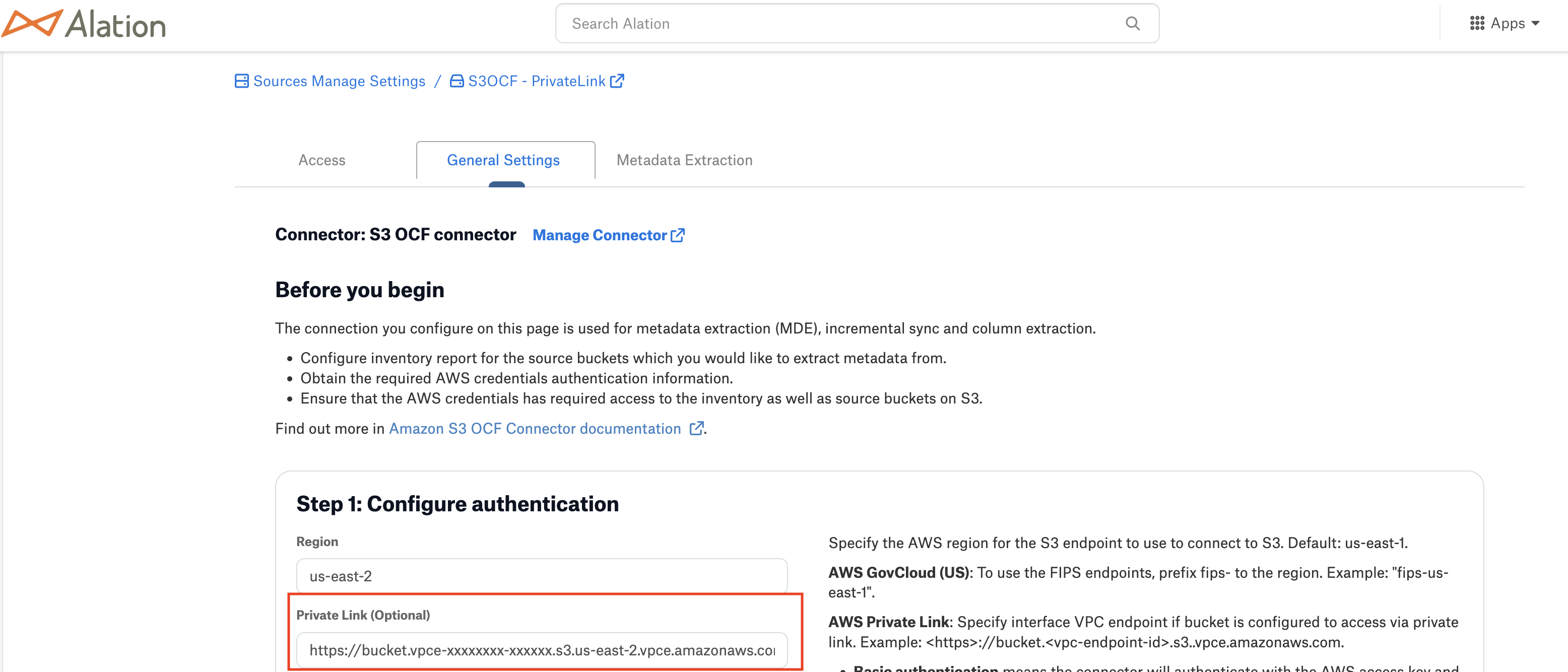
If you use a custom Amazon S3 interface VPC endpoint, for example in on-premises or customer-managed virtual private cloud (VPC) environments, specify the endpoint URL in the Private Link field on the General Settings tab under Configure Authentication.
Note
Leave the Private Link field on the General Settings page under Configure Authentication blank when you use the Alation-provisioned Amazon S3 VPC gateway endpoint. Use this field only for a custom Amazon S3 interface VPC endpoint.
Format to use: https://<bucket>.<vpc-endpoint-id>.s3.<region>.vpce.amazonaws.com. For example: https://my-bucket.vpce-1a2b3c4d-xyz.s3.us-east-1.vpce.amazonaws.com