
Overview
Alation Cloud Service Applies to Alation Cloud Service instances of Alation
Customer Managed Applies to customer-managed instances of Alation
Enhanced Connector Enhanced connectors add extended capabilities and require a separate entitlement in addition to your Alation platform license.
This enhanced connector is used to catalog Sigma BI data sources in Alation. It extracts Sigma objects like reports and fields and catalogs the objects in Alation. Alation users can then search for Sigma objects, curate the corresponding catalog object pages, apply policies, and understand the data lineage. The connector is available as a Zip file that can be uploaded and installed in the Alation application.
To get the Sigma enhanced connector contact the Forward Deployed Engineering team or ask your Alation account team.
Supported Sigma Versions
The following Sigma versions are supported by the connector:
Sigma Version |
Connector Support |
|---|---|
no public Sigma version number is published |
Alation 2022.4 for the legacy interface. Alation 2023.3.2 for the v2 interface |
Team
The following administrators are required to install this connector:
Sigma Administrator:
Creates the Sigma API Token
Determines the Sigma cloud provider
Alation Server Admin:
Installs the connector
Creates a BI source
Configures the BI source
Scope
The table below describes the dependencies and operations supported by the connector.
Feature |
Description |
Availability |
Authentication |
||
API Token |
Authentication with an API Token created in the Sigma Administration interface |
Yes |
Extracted Metadata Objects |
||
Workspaces |
Logical areas in Sigma where teams can collaborate |
Yes |
Folders |
Organizational units within Sigma can contain multiple workbooks or datasets. |
Yes |
Workbooks |
Interactive sheets in Sigma where data is analyzed and visualized. |
Yes |
Workbook Owner |
The individual who created or has ownership rights over a specific workbook. |
Yes |
Workbook Created Timestamp |
The exact time and date when a workbook was initially created in Sigma. |
Yes |
Workbook Updated Timestamp |
The most recent time and date when a workbook was modified in Sigma. |
Yes |
Pages |
Individual screens / tabs in a workbook with specific pieces of analyzed data. |
Yes |
Page Elements |
Visualizations, tables, and other elements within a page. |
Yes |
Columns |
Column definitions for page elements and datasets. |
Yes |
Datasets |
Collections of data elements in Sigma that serve as the source for analyses in workbooks including tables and visualizations. |
Yes |
Dataset Owner |
The individual who created or has ownership rights over a specific dataset. |
Yes |
Dataset Created Timestamp |
The exact time and date when a dataset was initially created in Sigma. |
Yes |
Dataset Updated Timestamp |
The most recent time and date when a dataset was modified in Sigma. |
Yes |
Connections |
Data source connections configured in Sigma. |
Yes |
Members/Users |
Sigma user accounts and their membership information. |
Yes |
Teams |
Sigma team groupings for permission management. |
Yes |
Tags |
Sigma tags applied to workbooks for organization and filtering. |
Yes |
Alation Catalog Features |
||
Metadata Extraction (MDE) |
The process of retrieving detailed information about Sigma’s various objects and importing them into Alation. |
Yes |
Lineage |
Automatic lineage extraction showing connections between Sigma elements and upstream data sources. |
Yes |
Permission Mirroring |
Mirror Sigma permissions to Alation for access control. Requires Admin token. |
Yes |
Object Preview |
Extract workbook preview images for display in Alation catalog. |
Yes |
Tag-based Filtering |
Filter extraction to only objects with specific Sigma tags. |
Yes |
Object Mapping
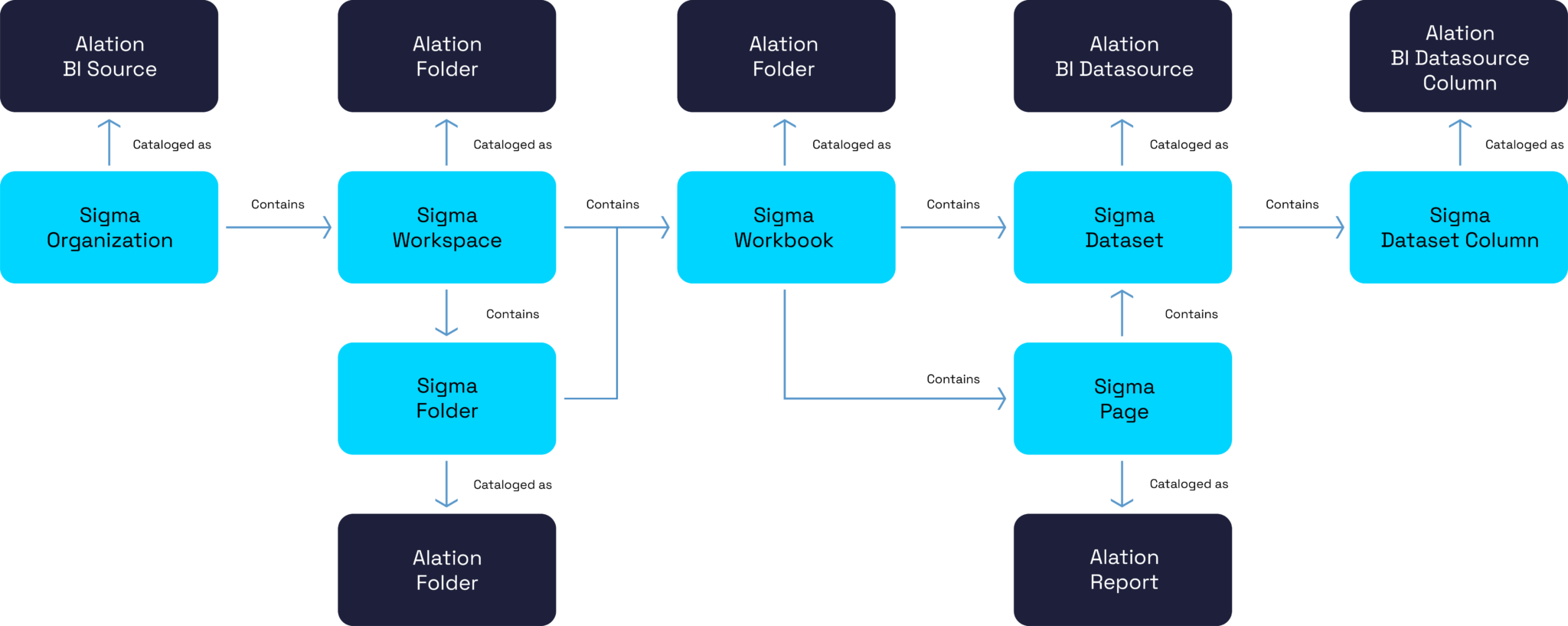
The diagram below describes the metadata objects extracted by this connector, their hierarchy, and how they are mapped to objects in Alation.
Note
The diagram illustrates the core object hierarchy. The extraction process also includes Page Elements (BI Report Sheets), Columns (BI Report Columns), Connections, Members, Teams, and Tags. For a comprehensive list, refer to the Extracted Metadata Objects table.
Permission Mirroring
Permission mirroring ensures that user access to Sigma objects in Alation matches the permissions those users have in Sigma. When enabled, users in Alation will only see Sigma workspaces, folders, workbooks, pages, and datasets they are authorized to view in Sigma—maintaining consistent visibility and governance across both systems.
During metadata extraction, the connector retrieves permission data from Sigma and applies it so that each Alation user can view only the objects they are permitted to access in Sigma. If permissions change in Sigma, those updates are reflected in Alation on the next extraction run.
Permission mirroring applies to the following Sigma object types:
Workspaces
Folders
Workbooks
Pages
Datasets
This applies to all users with access to the Sigma source in Alation, including administrators (admins are automatically included for coverage).
Note
Permission mirroring requires Admin-level API credentials. Enabling this feature may increase extraction time because Alation retrieves permissions for each supported Sigma object.
To enable permission mirroring, see Configure Connection to the Sigma BI Source.
Sigma APIs Used
The following table lists the Sigma APIs used by this connector to extract metadata from Sigma:
Verb |
REST API Endpoint |
Description |
POST |
{apiURL}/v2/auth/token |
Returns the access and refresh tokens |
GET |
{apiURL}/v2/whoami |
Returns current authenticated user info |
GET |
{apiURL}/v2/workspaces |
Returns a list of workspaces |
GET |
{apiURL}/v2/workspaces/{workspaceId}/grants |
Returns workspace permission grants |
GET |
{apiURL}/v2/members |
Returns a list of members |
GET |
{apiURL}/v2/members/{memberId} |
Returns a specific member’s details |
GET |
{apiURL}/v2/members/{memberId}/files |
Returns all documents and folders accessible to a member |
GET |
{apiURL}/v2/files |
Returns all files |
GET |
{apiURL}/v2/workbooks/{workbookId}/pages |
Returns a list of pages in a workbook |
GET |
{apiURL}/v2/workbooks/{workbookId}/pages/{pageId}/elements |
Returns a list of elements in a workbook page |
GET |
{apiURL}/v2/workbooks/{workbookId}/elements/{elementId}/columns |
Returns the columns for an element in a workbook |
GET |
{apiURL}/v2/workbooks/{workbookId}/lineage/elements/{elementId} |
Returns lineage dependencies of a workbook element |
POST |
{apiURL}/v2/workbooks/{workbookId}/export |
Initiates workbook export for object preview |
GET |
{apiURL}/v2/connections |
Returns a list of data connections |
GET |
{apiURL}/v2/connections/paths/{iNodeId} |
Returns connection path for lineage resolution |
GET |
{apiURL}/v2/datasets/{datasetId}/sources |
Returns dataset source information |
GET |
{apiURL}/v2/tags |
Returns a list of tags |
GET |
{apiURL}/v2/tags/{tagId}/workbooks |
Returns workbooks with a specific tag |
GET |
{apiURL}/v2/teams/{teamId} |
Returns team information |
GET |
{apiURL}/v2/query/{queryId}/download |
Downloads export results (for object preview) |
If using these APIs for testing, the {apiURL} used must correspond to the cloud provider your Sigma organization is hosted on.
For additional information about these APIs, please review the Sigma documentation here.